> ## Documentation Index
> Fetch the complete documentation index at: https://turnkey-0e7c1f5b-onramp-quick-fix.mintlify.site/llms.txt
> Use this file to discover all available pages before exploring further.
# Social Logins
> Social logins provide a familiar and convenient way for users to access applications using their existing accounts from popular platforms like Google, Apple, or Facebook. Under the hood, this functionality is powered by OAuth - a robust authentication protocol that enables secure user verification through OpenID Connect ([OIDC](https://openid.net/specs/openid-connect-core-1_0.html)) tokens. This feature is available exclusively for sub-organization users.
Similar to [email auth](/authentication/email), social login authentication is ideal for users who prefer not to manage API keys or [passkeys](/authentication/passkeys/introduction) directly. This makes it particularly well-suited for onboarding users who are comfortable with traditional web2-style accounts but may be unfamiliar with cryptographic keys and credentials. An example implementing social login authentication for an organization can be found in our SDK repo [here](https://github.com/tkhq/sdk/tree/main/examples/oauth).
## Roles and responsibilities
* **Turnkey**: runs verifiable infrastructure to create credentials and verify OIDC tokens
* **Parent**: that's you! **For the rest of this guide we'll assume you, the reader, are a Turnkey customer**. We assume that you have:
* an existing Turnkey organization (we'll refer to this organization as "the parent organization")
* a web application frontend (we'll refer to this as just "app" or "web app")
* a backend able to sign and POST Turnkey activities ("backend" or "parent backend")
* **End-User**: the end-user is a user of your web app. They have an account with Google.
* **OIDC Provider**: a provider able to authenticate your End-Users and provide OIDC tokens as proof. We'll use [Google](https://developers.google.com/identity/openid-connect/openid-connect) as an example.
## OAuth step-by-step
### Registration (signup)
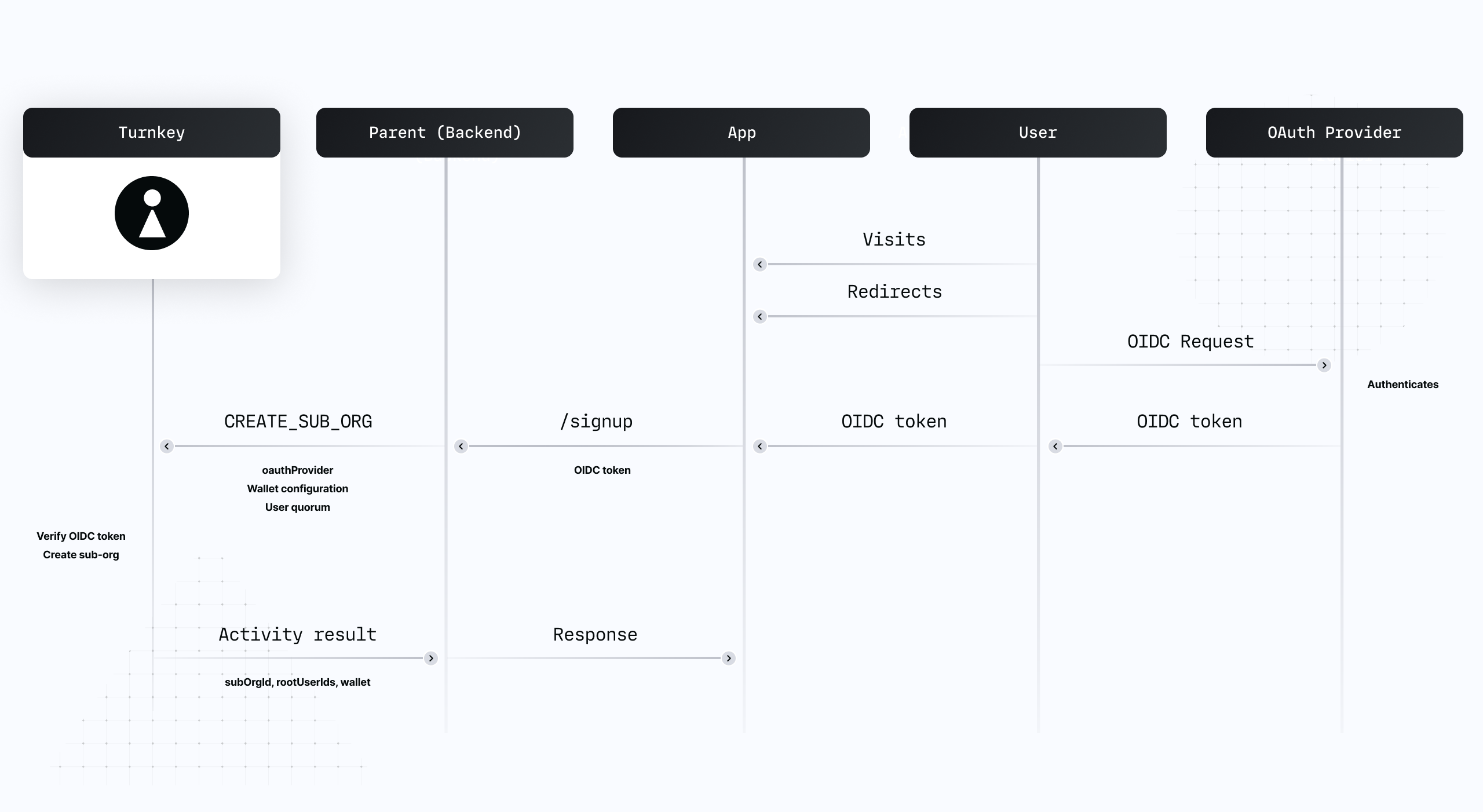 1. **End-User** enters the signup flow on the app, gets redirected to Google for authentication.
2. Upon completion, the **Parent**'s backend receives the OIDC token authenticating **End-User**.
3. This token is used inside of a `CREATE_SUB_ORGANIZATION` activity to register Google as the Oauth provider under the root user.
4. **Turnkey** verifies the OIDC token and creates a new sub-organization.
The user is now registered: a sub-organization under the parent organization has been created with a a root user, authenticated via an OAuth Provider. Concretely:
* `issuer` is set to `https://accounts.google.com`
* `audience` is set to `` (your Oauth app ID)
* `subject` is set `` (the user ID of `End-User` on Google's side)
### Authentication (login)
1. **End-User** enters the signup flow on the app, gets redirected to Google for authentication.
2. Upon completion, the **Parent**'s backend receives the OIDC token authenticating **End-User**.
3. This token is used inside of a `CREATE_SUB_ORGANIZATION` activity to register Google as the Oauth provider under the root user.
4. **Turnkey** verifies the OIDC token and creates a new sub-organization.
The user is now registered: a sub-organization under the parent organization has been created with a a root user, authenticated via an OAuth Provider. Concretely:
* `issuer` is set to `https://accounts.google.com`
* `audience` is set to `` (your Oauth app ID)
* `subject` is set `` (the user ID of `End-User` on Google's side)
### Authentication (login)
 1. **End-User** enters the login flow on the app, gets redirected to Google for authentication.
2. Upon completion, `Parent backend` receives the OIDC token authenticating **End-User**.
3. This token is used inside of an `OAUTH_LOGIN` activity, signed by the **Parent**'s backend.
4. **Turnkey** verifies the OIDC token and encrypts an expiring API key credential to **End-User**.
5. **End-User** decrypts the credential.
The user is now authenticated and able to perform Turnkey activities.
## OIDC token verification
All OIDC tokens are verified inside of Turnkey's [secure enclaves](/security/secure-enclaves).
We've designed a new secure enclave to fetch TLS content securely and bring [non-repudiation](https://en.wikipedia.org/wiki/Non-repudiation#In_digital_security) on top of TLS content: our TLS fetcher returns a URL and the fetched content, signed by the TLS fetcher's quorum key. By trusting the TLS fetcher quorum key, other Turnkey enclaves can bring TLS-fetched data into their computation safely. Verifying OIDC token is the first computation which requires this!
To verify an OIDC token, other Turnkey enclaves receive the OIDC token as well as:
* the signed content of the issuer's OpenId configuration. OpenId configuration **must** be hosted under `/.well-known/openid-configuration` for each domain. For Google for example, the issuer configuration is at [`accounts.google.com/.well-known/openid-configuration`](https://accounts.google.com/.well-known/openid-configuration). This JSON document contains, among other thing, a `jwksUri` key. The value for this key is a URL hosting the list of currently-valid OIDC token signers.
* the signed content of the issuer's `jwksUri` (e.g., for Google, the `jwksUri` is [`googleapis.com/oauth2/v3/cert`](https://www.googleapis.com/oauth2/v3/certs)). This is a list of public keys against which the secure enclave can verify tokens. Note: **these public keys rotate periodically** (every \~6hrs), hence it's not possible to hardcode these public keys in our secure enclave code directly. We have to fetch them dynamically!
With all of that, an enclave can independently verify an OIDC token without making outbound requests. Once the token is parsed and considered authentic, our enclaves match the `iss`, `aud` and `sub` attributes against the registered OAuth providers on the Turnkey sub-organization. We also check `exp` to make sure the OIDC token is not expired, and the `nonce` attribute (see next section).
## Nonce restrictions in OIDC tokens
Our [`OAUTH_LOGIN`](/api-reference/user-auth/oauth_login) activity requires 2 parameters minimum:
* `oidcToken`: the base64 OIDC token
* `publicKey`: the client-side public key generated by the user
In order to prevent OIDC tokens from being used against multiple public keys, our enclaves parse the OIDC token and, as part of the validation logic, enforce that the `nonce` claim is set to `sha256(publicKey)`.
For example, if the iframe public key is `04bb76f9a8aaafbb0722fa184f66642ae425e2a032bde8ffa0479ff5a93157b204c7848701cf246d81fd58f6c4c47a437d9f81e6a183042f2f1aa2f6aa28e4ab65`, our enclaves expect the OIDC token nonce to be `1f9570d976946c0cb72f0e853eea0fb648b5e9e9a2266d25f971817e187c9b18`.
This restriction only applies during **authentication** (`OAUTH` activity). Registration via `CREATE_OAUTH_PROVIDER` and `CREATE_SUB_ORGANIZATION` activities is not affected since these activities do not accept a `publicKey` and do not return encrypted credentials as a result.
If your OAuth provider does not allow you to customize `nonce` claims, Turnkey also accepts and validates `tknonce` claims. This is an alternative claim that will be considered. Only one of (`nonce`, `tknonce`) needs to be set to `sha256(publicKey)`; not both.
## OAuth vs. OIDC
[OAuth2.0](https://datatracker.ietf.org/doc/html/rfc6749) is a separate protocol from [OIDC](https://openid.net/specs/openid-connect-core-1_0.html), with distinct goals:
* "OAuth2.0" is an authorization framework
* "OIDC" is an authentication framework
We chose to name this feature "OAuth" because of the term familiarity: most Turnkey customers will have to setup an "OAuth" app with Google, and the user experience is often referred to as "OAuth" flows regardless of the protocol underneath.
## Providers
Below, some details and pointers about specific providers we've worked with before. If yours isn't listed below it does not mean it can't be supported: any OIDC provider should work with Turnkey's OAuth.
### Google
This provider is extensively tested and supported. We've integrated it in our demo wallet (hosted at [https://wallet.tx.xyz](https://wallet.tx.xyz)), along with Apple and Facebook:
1. **End-User** enters the login flow on the app, gets redirected to Google for authentication.
2. Upon completion, `Parent backend` receives the OIDC token authenticating **End-User**.
3. This token is used inside of an `OAUTH_LOGIN` activity, signed by the **Parent**'s backend.
4. **Turnkey** verifies the OIDC token and encrypts an expiring API key credential to **End-User**.
5. **End-User** decrypts the credential.
The user is now authenticated and able to perform Turnkey activities.
## OIDC token verification
All OIDC tokens are verified inside of Turnkey's [secure enclaves](/security/secure-enclaves).
We've designed a new secure enclave to fetch TLS content securely and bring [non-repudiation](https://en.wikipedia.org/wiki/Non-repudiation#In_digital_security) on top of TLS content: our TLS fetcher returns a URL and the fetched content, signed by the TLS fetcher's quorum key. By trusting the TLS fetcher quorum key, other Turnkey enclaves can bring TLS-fetched data into their computation safely. Verifying OIDC token is the first computation which requires this!
To verify an OIDC token, other Turnkey enclaves receive the OIDC token as well as:
* the signed content of the issuer's OpenId configuration. OpenId configuration **must** be hosted under `/.well-known/openid-configuration` for each domain. For Google for example, the issuer configuration is at [`accounts.google.com/.well-known/openid-configuration`](https://accounts.google.com/.well-known/openid-configuration). This JSON document contains, among other thing, a `jwksUri` key. The value for this key is a URL hosting the list of currently-valid OIDC token signers.
* the signed content of the issuer's `jwksUri` (e.g., for Google, the `jwksUri` is [`googleapis.com/oauth2/v3/cert`](https://www.googleapis.com/oauth2/v3/certs)). This is a list of public keys against which the secure enclave can verify tokens. Note: **these public keys rotate periodically** (every \~6hrs), hence it's not possible to hardcode these public keys in our secure enclave code directly. We have to fetch them dynamically!
With all of that, an enclave can independently verify an OIDC token without making outbound requests. Once the token is parsed and considered authentic, our enclaves match the `iss`, `aud` and `sub` attributes against the registered OAuth providers on the Turnkey sub-organization. We also check `exp` to make sure the OIDC token is not expired, and the `nonce` attribute (see next section).
## Nonce restrictions in OIDC tokens
Our [`OAUTH_LOGIN`](/api-reference/user-auth/oauth_login) activity requires 2 parameters minimum:
* `oidcToken`: the base64 OIDC token
* `publicKey`: the client-side public key generated by the user
In order to prevent OIDC tokens from being used against multiple public keys, our enclaves parse the OIDC token and, as part of the validation logic, enforce that the `nonce` claim is set to `sha256(publicKey)`.
For example, if the iframe public key is `04bb76f9a8aaafbb0722fa184f66642ae425e2a032bde8ffa0479ff5a93157b204c7848701cf246d81fd58f6c4c47a437d9f81e6a183042f2f1aa2f6aa28e4ab65`, our enclaves expect the OIDC token nonce to be `1f9570d976946c0cb72f0e853eea0fb648b5e9e9a2266d25f971817e187c9b18`.
This restriction only applies during **authentication** (`OAUTH` activity). Registration via `CREATE_OAUTH_PROVIDER` and `CREATE_SUB_ORGANIZATION` activities is not affected since these activities do not accept a `publicKey` and do not return encrypted credentials as a result.
If your OAuth provider does not allow you to customize `nonce` claims, Turnkey also accepts and validates `tknonce` claims. This is an alternative claim that will be considered. Only one of (`nonce`, `tknonce`) needs to be set to `sha256(publicKey)`; not both.
## OAuth vs. OIDC
[OAuth2.0](https://datatracker.ietf.org/doc/html/rfc6749) is a separate protocol from [OIDC](https://openid.net/specs/openid-connect-core-1_0.html), with distinct goals:
* "OAuth2.0" is an authorization framework
* "OIDC" is an authentication framework
We chose to name this feature "OAuth" because of the term familiarity: most Turnkey customers will have to setup an "OAuth" app with Google, and the user experience is often referred to as "OAuth" flows regardless of the protocol underneath.
## Providers
Below, some details and pointers about specific providers we've worked with before. If yours isn't listed below it does not mean it can't be supported: any OIDC provider should work with Turnkey's OAuth.
### Google
This provider is extensively tested and supported. We've integrated it in our demo wallet (hosted at [https://wallet.tx.xyz](https://wallet.tx.xyz)), along with Apple and Facebook:
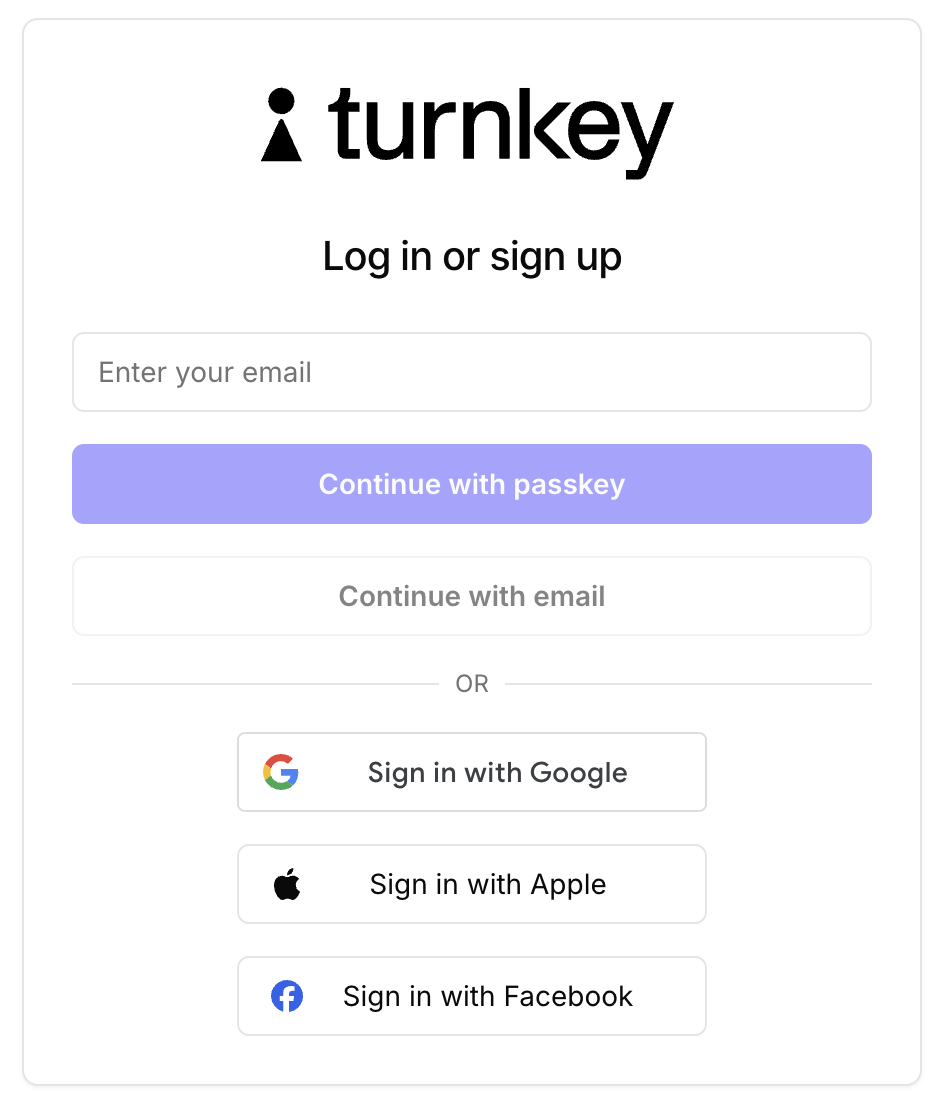 The code is open-source, feel free to [check it out](https://github.com/tkhq/demo-embedded-wallet) for reference. The exact line where the OAuth component is loaded is here: [ui/src/screens/LandingScreen.tsx](https://github.com/tkhq/demo-embedded-wallet/blob/d4ec308e9ce0bf0da7b64da2b39e1a80c077eb82/ui/src/screens/LandingScreen.tsx#L384).
The main documentation for Google OIDC is available [here](https://github.com/tkhq/demo-embedded-wallet/blob/bf0e2292cbd2ee9cde6b241591b077fadf7ee71b/src/components/auth.tsx#L157).
### Apple
Apple integration is also extensively tested and supported, and is integrated into our demo wallet (hosted at [https://wallet.tx.xyz](https://wallet.tx.xyz)). The code provides an [example component](https://github.com/tkhq/demo-embedded-wallet/blob/bf0e2292cbd2ee9cde6b241591b077fadf7ee71b/src/components/apple-auth.tsx) as well as an [example redirect handler](https://github.com/tkhq/demo-embedded-wallet/blob/bf0e2292cbd2ee9cde6b241591b077fadf7ee71b/src/app/\(landing\)/oauth-callback/apple/page.tsx).
Documentation for Apple OIDC can be found [here](https://developer.apple.com/documentation/sign_in_with_apple/sign_in_with_apple_rest_api/authenticating_users_with_sign_in_with_apple).
### Facebook
Facebook OIDC requires a [manual flow with PFKE](https://developers.facebook.com/docs/facebook-login/guides/advanced/oidc-token/) (Proof for Key Exchange). This flow requires a few extra steps compared with Apple or Google. Specifically:
* You will need to generate a **code verifier** that can either be recalled (e.g. from a database) or reassembled in a later request.
* You will need to provide a **code challenge** as a parameter of the OAuth redirect that is either the code verifier itself or the hash of the code verifier.
* Instead of receiving the OIDC token after the OAuth flow, you will receive an **auth code** that must be exchanged for an OIDC token in a subsequent request. The code verifier and your app's ID are also required in this exchange.
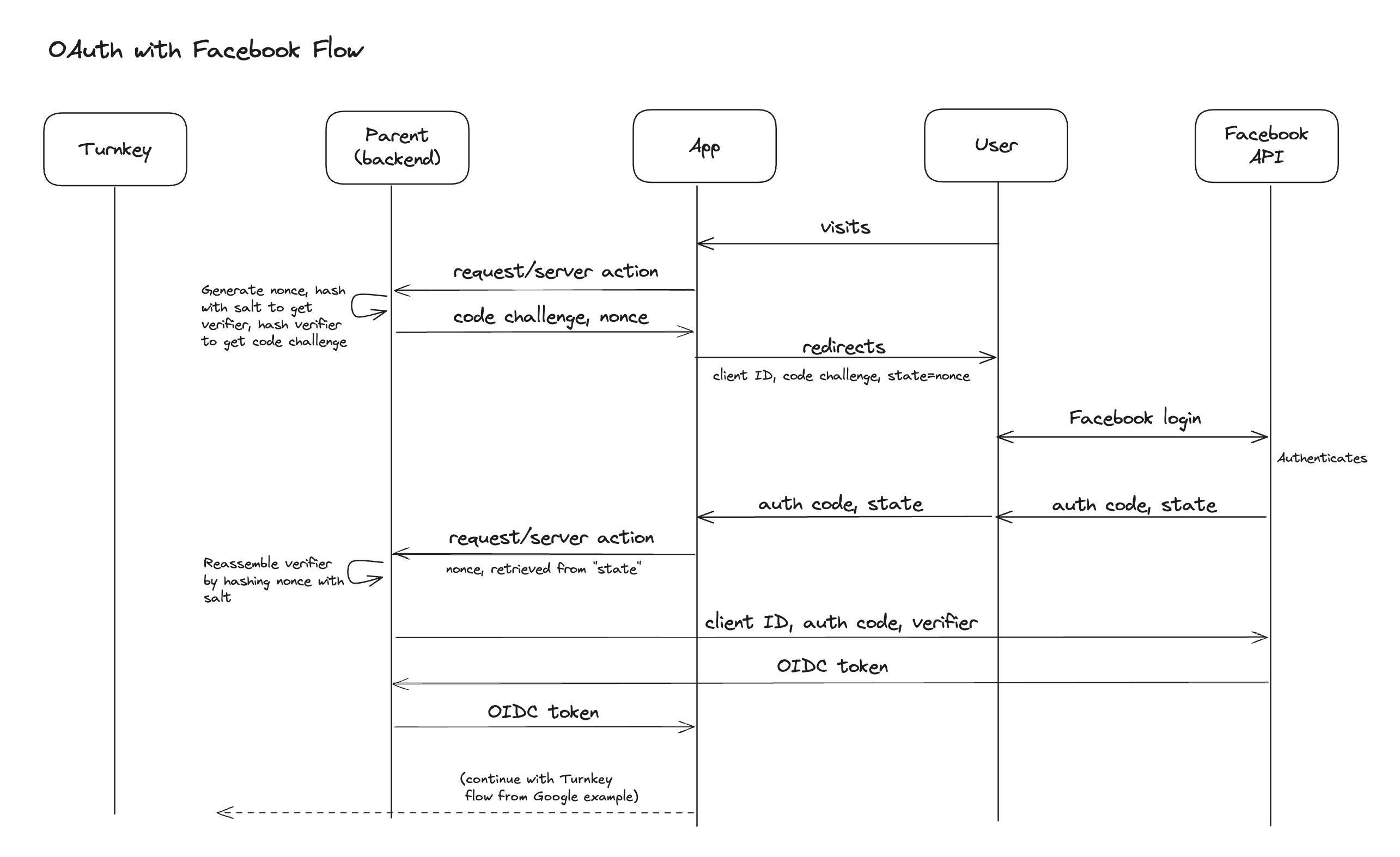
In our example demo wallet, we opt to avoid using a database in the authentication process and instead generate our verification code serverside using the hash of a nonce and a secret salt value. The nonce is then passed to and returned from the Facebook API as a **state** parameter (see [the API spec](https://developers.facebook.com/docs/facebook-login/guides/advanced/oidc-token/) for details). Finally, the server reconstructs the verification code by re-hashing the nonce and the the salt. The full flow is displayed below:
The code is open-source, feel free to [check it out](https://github.com/tkhq/demo-embedded-wallet) for reference. The exact line where the OAuth component is loaded is here: [ui/src/screens/LandingScreen.tsx](https://github.com/tkhq/demo-embedded-wallet/blob/d4ec308e9ce0bf0da7b64da2b39e1a80c077eb82/ui/src/screens/LandingScreen.tsx#L384).
The main documentation for Google OIDC is available [here](https://github.com/tkhq/demo-embedded-wallet/blob/bf0e2292cbd2ee9cde6b241591b077fadf7ee71b/src/components/auth.tsx#L157).
### Apple
Apple integration is also extensively tested and supported, and is integrated into our demo wallet (hosted at [https://wallet.tx.xyz](https://wallet.tx.xyz)). The code provides an [example component](https://github.com/tkhq/demo-embedded-wallet/blob/bf0e2292cbd2ee9cde6b241591b077fadf7ee71b/src/components/apple-auth.tsx) as well as an [example redirect handler](https://github.com/tkhq/demo-embedded-wallet/blob/bf0e2292cbd2ee9cde6b241591b077fadf7ee71b/src/app/\(landing\)/oauth-callback/apple/page.tsx).
Documentation for Apple OIDC can be found [here](https://developer.apple.com/documentation/sign_in_with_apple/sign_in_with_apple_rest_api/authenticating_users_with_sign_in_with_apple).
### Facebook
Facebook OIDC requires a [manual flow with PFKE](https://developers.facebook.com/docs/facebook-login/guides/advanced/oidc-token/) (Proof for Key Exchange). This flow requires a few extra steps compared with Apple or Google. Specifically:
* You will need to generate a **code verifier** that can either be recalled (e.g. from a database) or reassembled in a later request.
* You will need to provide a **code challenge** as a parameter of the OAuth redirect that is either the code verifier itself or the hash of the code verifier.
* Instead of receiving the OIDC token after the OAuth flow, you will receive an **auth code** that must be exchanged for an OIDC token in a subsequent request. The code verifier and your app's ID are also required in this exchange.
In our example demo wallet, we opt to avoid using a database in the authentication process and instead generate our verification code serverside using the hash of a nonce and a secret salt value. The nonce is then passed to and returned from the Facebook API as a **state** parameter (see [the API spec](https://developers.facebook.com/docs/facebook-login/guides/advanced/oidc-token/) for details). Finally, the server reconstructs the verification code by re-hashing the nonce and the the salt. The full flow is displayed below:
 Code for the [redirect component](https://github.com/tkhq/demo-embedded-wallet/blob/bf0e2292cbd2ee9cde6b241591b077fadf7ee71b/src/components/facebook-auth.tsx), [OAuth callback](https://github.com/tkhq/demo-embedded-wallet/blob/bf0e2292cbd2ee9cde6b241591b077fadf7ee71b/src/app/\(landing\)/oauth-callback/facebook/page.tsx), and [code exchange](https://github.com/tkhq/demo-embedded-wallet/blob/bf0e2292cbd2ee9cde6b241591b077fadf7ee71b/src/actions/turnkey.ts#L54) are all available in the example wallet repo.
If you prefer to use a database such as Redis instead of reassembling the verification code, you can store the verification code and retrieve it in the exchange stage using a lookup key either passed as **state** or stored in local browser storage.
### Auth0
This provider was tested successfully and offers a wide range of authentication factors and integration. For example, Auth0 can wrap Twitter's auth or any other ["Social Connection"](https://marketplace.auth0.com/features/social-connections).
In the testing process we discovered that Auth0 admins can manage users freely. Be careful about who can and can't access your Auth0 account: Auth0's management APIs allow for account merging. Specifically, anyone with a `users:update` scope token can call [this endpoint](https://auth0.com/docs/api/management/v2/users/post-identities) to arbitrarily link an identity.
For example, if a Google-authenticated user (OIDC token `sub` claim: `google-oauth2|118121659617646047510`) gets merged into a Twitter-authenticated user (OIDC token `sub` claim: `twitter|47169608`), the OIDC token obtained by logging in through Google post-merge will be `twitter|47169608`. This can be surprising and lead to account takeover if an Auth0 admin is malicious. This is documented in Auth0's own docs, [here](https://auth0.com/docs/manage-users/user-accounts/user-account-linking#precautions).
### AWS Cognito
The main thing to call out is the inability to pass custom `nonce` claims easily. To pass the hash of the end-user's iframe public key, use a custom `tknonce` claim instead.
### Social linking
Social linking is the concept of automatically linking an email address to a Turnkey user by authenticating with a social provider. This allows an end-user to authenticate with the social provider, or a matching email address. Currently, we only allow automatic linking for Google social logins.
The cases are as follows:
1. The end-user authenticates with Google. Their email address is automatically linked to their authentication methods and considered “verified,” allowing them to log in with email OTP or email auth in the future.
2. The end-user authenticates with a Google email address (e.g., @gmail.com) via email OTP or email auth. If they later authenticate with Google, the Google OIDC provider will automatically be added as a valid login method, provided the email matches.
3. The end-user has existing non-Google authentication methods (e.g. phone number, passkeys, etc.) and later adds Google OIDC as a login method (via [CREATE\_OAUTH\_PROVIDERS](/api-reference/activities/create-oauth-providers#api-key)). The email address in the Google account will be automatically marked as "verified" and linked to the existing user.
For more information on how to implement social linking, see the [social linking code example](/embedded-wallets/code-examples/social-linking).
Code for the [redirect component](https://github.com/tkhq/demo-embedded-wallet/blob/bf0e2292cbd2ee9cde6b241591b077fadf7ee71b/src/components/facebook-auth.tsx), [OAuth callback](https://github.com/tkhq/demo-embedded-wallet/blob/bf0e2292cbd2ee9cde6b241591b077fadf7ee71b/src/app/\(landing\)/oauth-callback/facebook/page.tsx), and [code exchange](https://github.com/tkhq/demo-embedded-wallet/blob/bf0e2292cbd2ee9cde6b241591b077fadf7ee71b/src/actions/turnkey.ts#L54) are all available in the example wallet repo.
If you prefer to use a database such as Redis instead of reassembling the verification code, you can store the verification code and retrieve it in the exchange stage using a lookup key either passed as **state** or stored in local browser storage.
### Auth0
This provider was tested successfully and offers a wide range of authentication factors and integration. For example, Auth0 can wrap Twitter's auth or any other ["Social Connection"](https://marketplace.auth0.com/features/social-connections).
In the testing process we discovered that Auth0 admins can manage users freely. Be careful about who can and can't access your Auth0 account: Auth0's management APIs allow for account merging. Specifically, anyone with a `users:update` scope token can call [this endpoint](https://auth0.com/docs/api/management/v2/users/post-identities) to arbitrarily link an identity.
For example, if a Google-authenticated user (OIDC token `sub` claim: `google-oauth2|118121659617646047510`) gets merged into a Twitter-authenticated user (OIDC token `sub` claim: `twitter|47169608`), the OIDC token obtained by logging in through Google post-merge will be `twitter|47169608`. This can be surprising and lead to account takeover if an Auth0 admin is malicious. This is documented in Auth0's own docs, [here](https://auth0.com/docs/manage-users/user-accounts/user-account-linking#precautions).
### AWS Cognito
The main thing to call out is the inability to pass custom `nonce` claims easily. To pass the hash of the end-user's iframe public key, use a custom `tknonce` claim instead.
### Social linking
Social linking is the concept of automatically linking an email address to a Turnkey user by authenticating with a social provider. This allows an end-user to authenticate with the social provider, or a matching email address. Currently, we only allow automatic linking for Google social logins.
The cases are as follows:
1. The end-user authenticates with Google. Their email address is automatically linked to their authentication methods and considered “verified,” allowing them to log in with email OTP or email auth in the future.
2. The end-user authenticates with a Google email address (e.g., @gmail.com) via email OTP or email auth. If they later authenticate with Google, the Google OIDC provider will automatically be added as a valid login method, provided the email matches.
3. The end-user has existing non-Google authentication methods (e.g. phone number, passkeys, etc.) and later adds Google OIDC as a login method (via [CREATE\_OAUTH\_PROVIDERS](/api-reference/activities/create-oauth-providers#api-key)). The email address in the Google account will be automatically marked as "verified" and linked to the existing user.
For more information on how to implement social linking, see the [social linking code example](/embedded-wallets/code-examples/social-linking).